TL;DR
- Choose Krea 2 Medium Turbo for 8 aspect ratios and a lower image price. Choose Krea 3 when you need controls such as
reasoning_levelandvariant. - Krea 2 costs $0.0215 per image and Krea 3 $0.036. The difference is $14.50 across 1,000 images. See the full budget table.
- Both models are available on HiAPI: Krea 2 and Krea 3. The perfume and floating-city pairs below show how the same submitted prompts produced different compositions.
Which differences affect the choice?
| Item | Krea 3 | Krea 2 Medium Turbo |
|---|---|---|
| Per image | $0.036 | $0.0215 |
| API model | krea-3/text-to-image | krea-2-medium-turbo |
| Framing | 6 image_size presets | 8 aspect_ratio options |
| 2.35:1 option | No matching preset | Supported |
| Prompt controls | reasoning_level: low / medium | creativity: raw / low / medium / high |
| Other controls | variant: berry / jam; negative_prompt for berry | Optional integer seed |
| File-format options | png / jpeg | No output_format parameter |
| Per task | 1 image, text-to-image | 1 image, text-to-image |
Krea 3's reasoning_level controls interpretation and expansion before generation. Krea 2's creativity controls how freely the prompt is interpreted. The controls are not interchangeable just because both include a setting named medium. For either model, specify the subject, placement, and materials that must remain recognizable, then choose the controls that serve the intended use.
What do two same-submitted-prompt pairs show?
Product photography: perfume on travertine
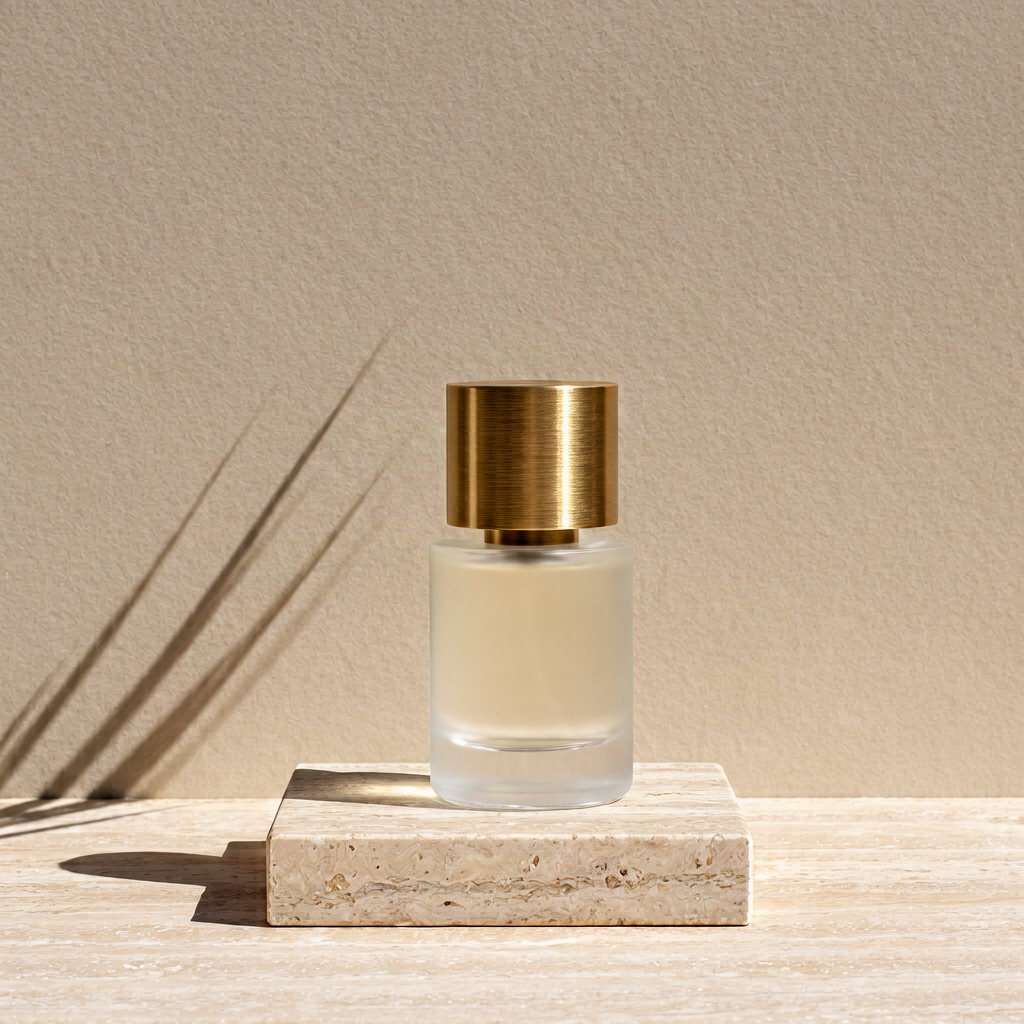
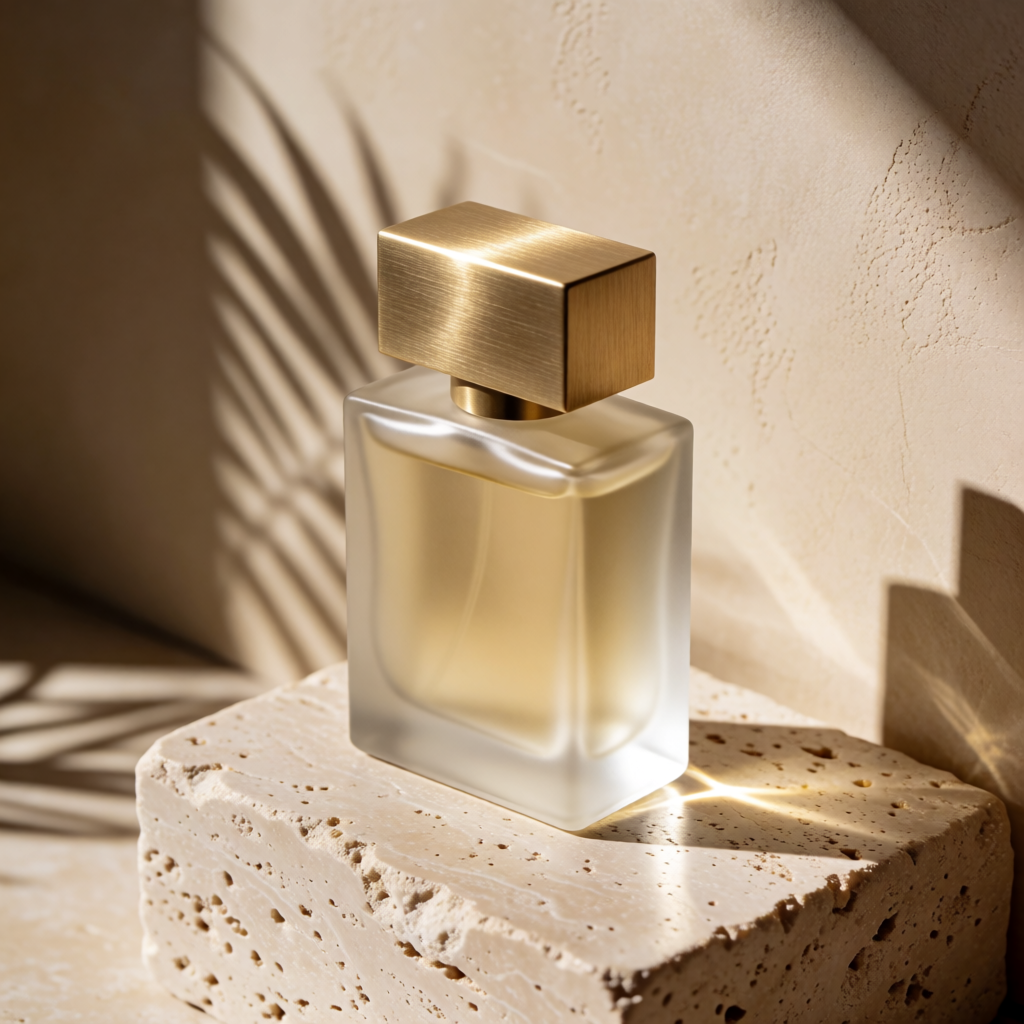
Studio product photograph of a frosted glass perfume bottle with a brushed brass cap standing on a block of travertine, hard afternoon sunlight casting a long palm-leaf shadow across a warm beige wall, crisp reflections, high-end editorial look
| Krea 3 | Krea 2 Medium Turbo |
|---|---|
 |  |
Generate with Krea 3 → · Generate with this prompt →
Left: krea-3/text-to-image, square_hd, berry, reasoning_level=medium, output_format=png, seed=31017; 1024×1024, 1:1, PNG, $0.036. Right: krea-2-medium-turbo, requested 1:1, creativity omitted (default low), seed omitted; 1024×1024, 1:1, PNG, $0.0215. The submitted prompt, displayed dimensions, aspect ratio and format match; model-specific controls are listed separately.
Links prefill only the prompt. For Krea 3, select square_hd, berry, medium and PNG; this image used seed 31017. For Krea 2, select 1:1 and low; the original task omitted seed.
The left image shows a cylindrical bottle and gold-colored cylindrical cap on a low rectangular stone block, with more space above the product. The right shows an angled rectangular bottle with a broad square cap, filling more of the frame. Both include a warm wall, stone and leaf shadows; compare silhouette, viewpoint and empty space for the intended layout.
Concept art: a floating city above clouds
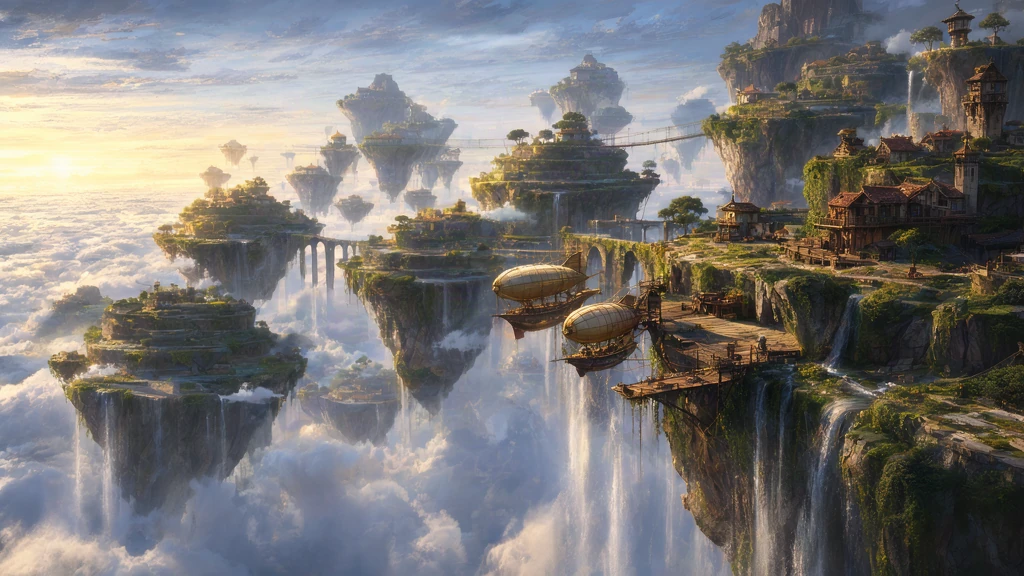
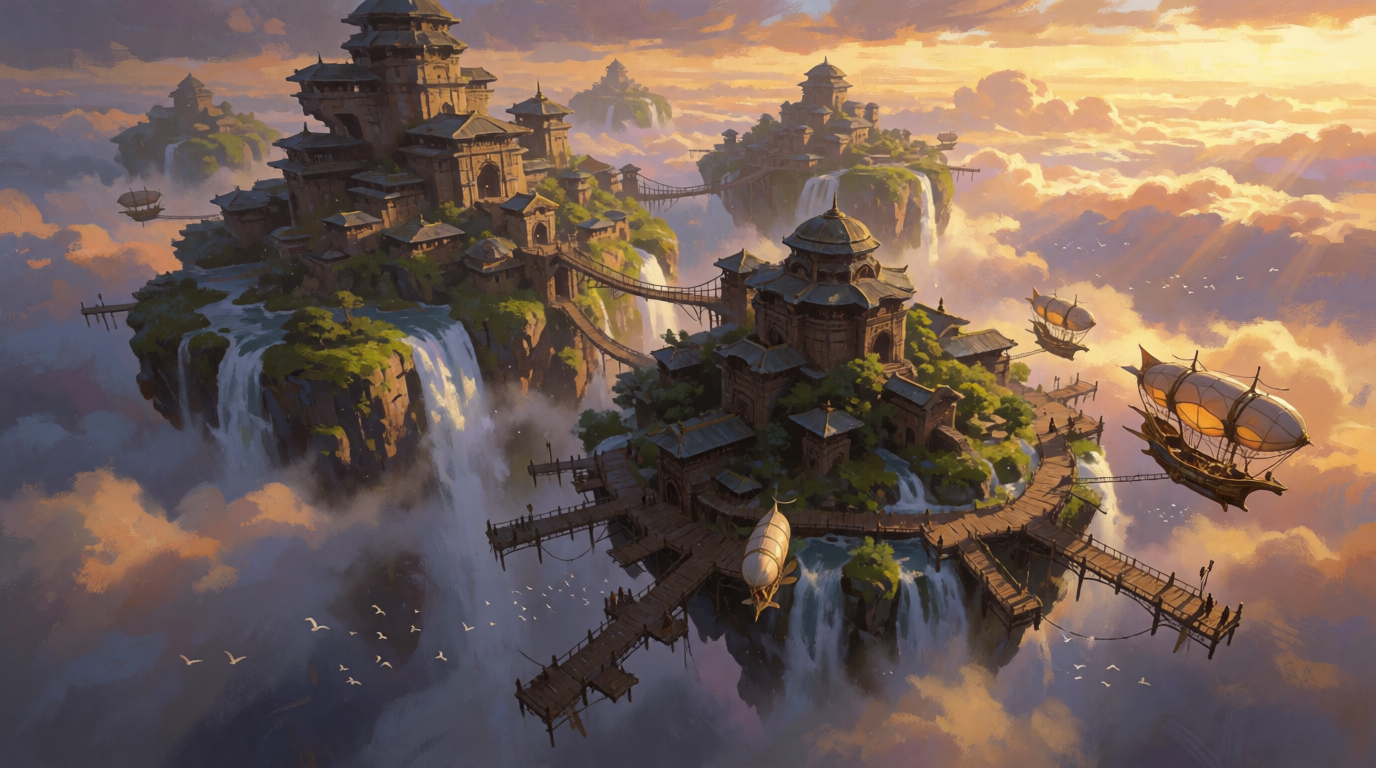
Concept art of a floating city built on terraced rock islands above a sea of clouds, waterfalls pouring off the edges, airships docking at wooden piers, golden sunrise light, painterly matte painting style
| Krea 3 | Krea 2 Medium Turbo |
|---|---|
 |  |
Generate with Krea 3 → · Generate with this prompt →
Left: krea-3/text-to-image, landscape_16_9, berry, reasoning_level=medium, seed unrecorded; 1024×576, 16:9 (approximately 1.778), WebP, $0.036. Right: krea-2-medium-turbo, requested 16:9, creativity omitted (default low), seed omitted; 1376×768, 43:24 (approximately 1.792), PNG, $0.0215. The submitted prompt matches; actual dimensions, aspect ratio and format differ.
Links prefill only the prompt. For Krea 3, select landscape_16_9, berry and medium; for Krea 2, select 16:9 and low. Krea 3's WebP is the existing display file; the current API format options are PNG and JPEG.
The left scene places bright sky on the left and a close rock island, piers, and airships on the right. The right scene anchors a tall tower on the left, lights orange clouds from the right, and places a large airship toward the lower right. Waterfalls, rock islands, and airborne transport are recognizable in both. Side-by-side scaling helps compare subject placement and color. Because the source dimensions differ, it cannot establish sharpness or a detail ceiling under matching output conditions.
Which model fits each scenario?
- Exploring many subjects: begin with Krea 2's $0.0215 rate to allocate candidate counts. Successful images you do not use still count toward spending.
- Building a cinematic website banner: Krea 2 accepts
2.35:1directly. Decide where the subject belongs in the banner before submission. - Adjusting expansion of a short prompt: Krea 3 offers
reasoning_level, plus berry and jam for exploring the resulting image. - Following a specific product shape: inspect the silhouette with either model. The rectangular and cylindrical caps above show why essential shapes belong in the prompt.
Which request fields change when switching?
These bodies retain the complete perfume prompt. Krea 3 uses the recorded settings for the new PNG. Krea 2 explicitly sets the default low value; the original image task omitted creativity. The bodies show how fields correspond, and submission generates new images.
{
  "model": "krea-3/text-to-image",
  "input": {
    "prompt": "Studio product photograph of a frosted glass perfume bottle with a brushed brass cap standing on a block of travertine, hard afternoon sunlight casting a long palm-leaf shadow across a warm beige wall, crisp reflections, high-end editorial look",
    "image_size": "square_hd",
    "variant": "berry",
    "reasoning_level": "medium",
    "output_format": "png",
    "seed": 31017
  }
}
{
  "model": "krea-2-medium-turbo",
  "input": {
    "prompt": "Studio product photograph of a frosted glass perfume bottle with a brushed brass cap standing on a block of travertine, hard afternoon sunlight casting a long palm-leaf shadow across a warm beige wall, crisp reflections, high-end editorial look",
    "aspect_ratio": "1:1",
    "creativity": "low"
  }
}
Both bodies go to POST /v1/tasks. Read the task identifier from data.taskId, query GET /v1/tasks/{taskId}, and read data.output[0].url after success. Rebuild input when switching: Krea 2 uses aspect_ratio and creativity; Krea 3 uses image_size, variant, and its other controls. The submit-and-query flow can be shared, while model-specific fields need separate handling.
The Krea 2 API tutorial provides complete code. For additional product, interior, and illustration examples, use the prompt guide.
FAQ
Do both pairs have matching dimensions and formats?
The perfume pair shares the submitted prompt and uses 1024×1024, 1:1 PNG files. The city pair differs in dimensions, actual aspect ratio and format. Model-specific controls also differ; the pairs illustrate these particular compositions.
Does Krea 3 always output a larger image?
No. In the city pair, Krea 3 is 1024×576 and Krea 2 is 1376×768. Price and output dimensions are separate considerations.
Can I switch by changing only model?
You also need to change input. Replace the size field and remove controls that the destination model does not accept.
Can I explore on Krea 2, then generate on Krea 3?
You can reuse the description. Both endpoints here are text-to-image, so the second generation does not automatically inherit the first image's composition. One image on each totals $0.0575.
Start with the perfume bottle: Generate with this prompt →, then specify the cap shape and viewpoint your layout needs.