Pick FLUX.1 Fill Pro when one region must change and everything else must stay exactly as it is: you send a source image, a same-size black-and-white mask and a prompt, and only the white area is repainted. Pick FLUX.1 Kontext Max when the whole frame gets restyled and you would rather not draw a mask: it takes a source image and a prompt, and your wording sets the boundary.
FLUX.1 Fill Pro is live on HiAPI. Open the model page to run an edit, and new accounts get 200 free credits on sign-up. Kontext Max has its own model page. Both cost the same $0.0715 per image.
Side by side
| FLUX.1 Fill Pro | FLUX.1 Kontext Max | |
|---|---|---|
| Input | Source + black-and-white mask + prompt | One source image + prompt |
| Mask required | Yes, same size as the source | No |
| What sets the edit boundary | The white area of the mask | The wording of the prompt |
| Output in this run | 1440 × 810, source ratio kept | 1328 × 752, source ratio kept |
| Settings | steps 15–50 (default 50), guidance 1.5–100 (default 60), seed, output_format | Driven by the source image and the prompt |
| Price | $0.0715 per image | $0.0715 per image |
| Best for | Local replacement, product retouching, background swaps, garment recolors | Full-frame repaint, restyling |
The price is identical, so the real question is who decides where the edit stops: a black-and-white mask in Fill Pro, a sentence in Kontext Max.
Same photo, same goal: what do the two outputs look like?
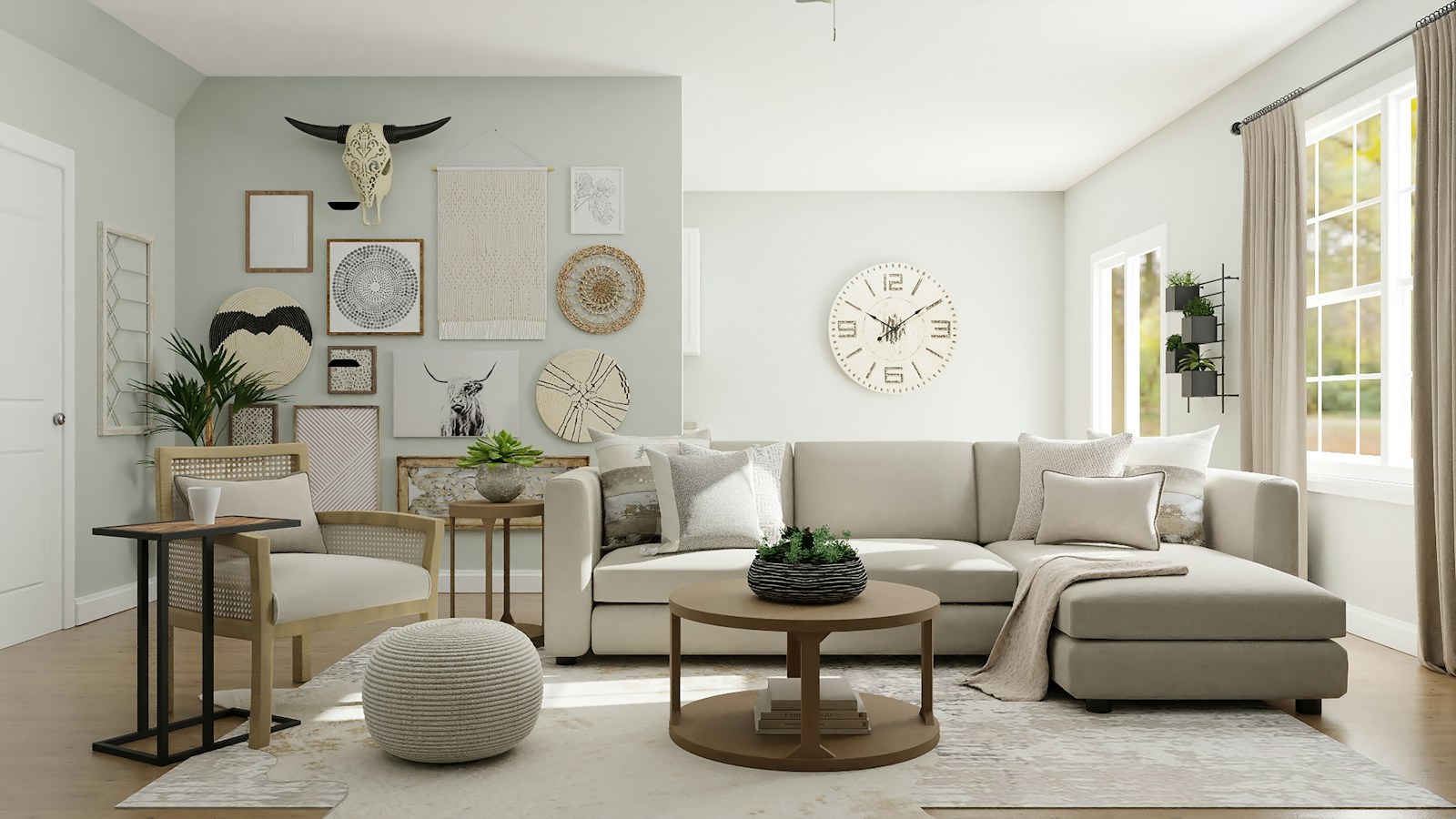
The source is a living room. A round wall clock hangs on the white back wall, a tapestry, woven discs, a bison skull and a plant sit on the left wall, and a window and sectional sofa fill the right. The goal: swap the wall behind the clock for a large abstract painting.
| FLUX.1 Fill Pro | FLUX.1 Kontext Max |
|---|---|
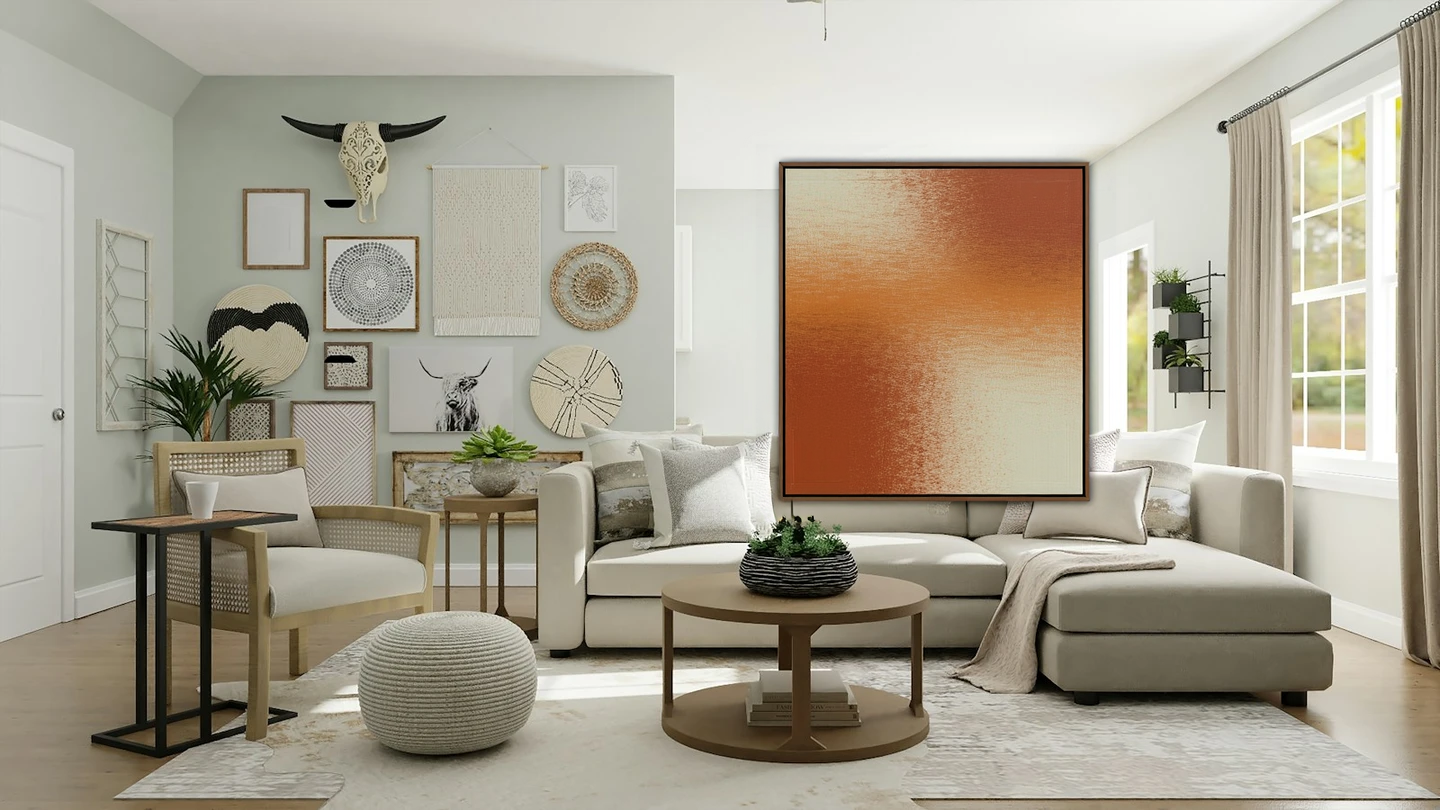 | 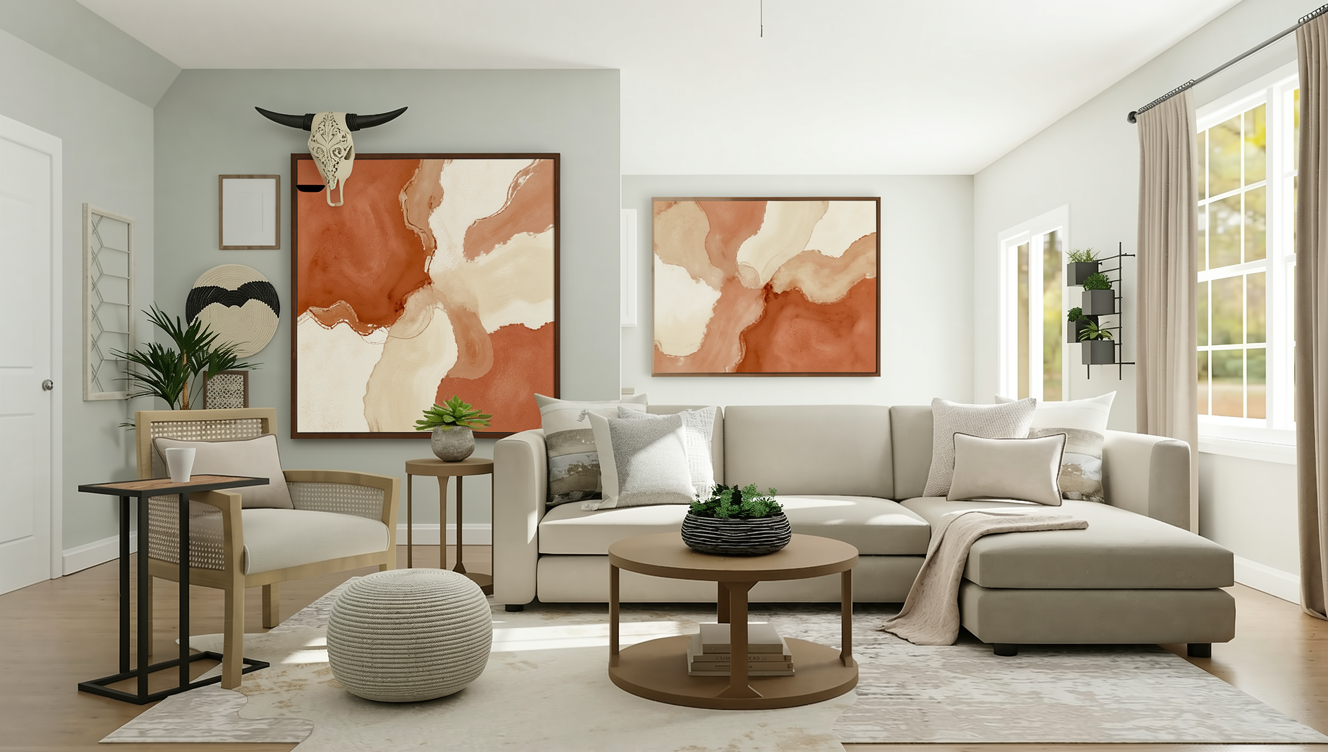 |
| Source + white-box mask + prompt, output 1440 × 810 | Source + prompt, no mask, output 1328 × 752 |
Same source, same goal, one generation each. The inputs are not the same: Fill Pro needs the source plus a same-size white-box mask plus the prompt, and the mask fixes the boundary; Kontext Max takes the source and the prompt with no mask field at all, so the words carry the boundary. To leave the mask as the only variable, both columns used the same prompt.
In day-to-day use, a Kontext Max prompt has to name the region itself, something like replace the area on the wall where the clock hangs with …. This comparison did not phrase it that way, so Kontext Max redrew the decorations across the whole wall. That is the difference in one sentence: without a mask the boundary is your wording, and loose wording widens the edit.
A large framed abstract painting in warm terracotta, sand and cream tones, hanging on the wall, with a thin dark wood frame; keep the room, sofa, furniture and lighting unchanged.
Generate with this prompt → The prompt is pre-filled; upload the source image and a same-size black-and-white mask, then hit Run.
The source used here is 1600 × 900, and so is its mask. The white box covers the wall where the clock hangs and nothing else.
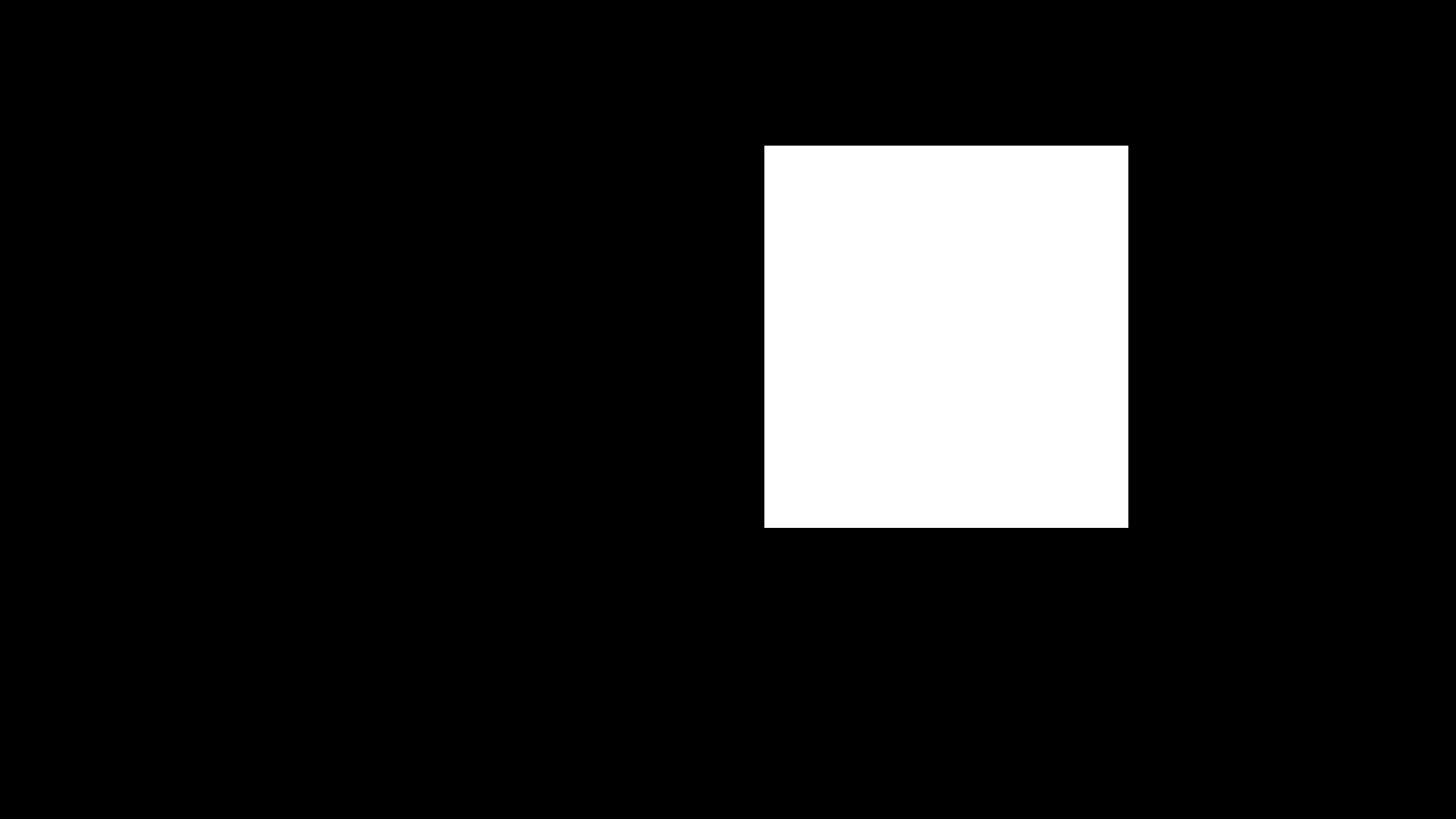
Black keeps the source, white is repainted. Everything outside the box is black, so nothing outside the box gets redrawn.
What differs, visibly?
- Edit boundary. Fill Pro changed only the area inside the masked box. Kontext Max has no mask, so the whole frame was redrawn: the discs, bison skull, woven hanging and small wall art on the left all became new wave-pattern abstracts.
- The rest of the frame. In the Fill Pro output, the tapestry, woven discs, bison skull, plant, sofa and light outside the box came back untouched, and a thin dark frame appeared inside the box. Kontext Max kept the window and sofa layout on the right, but the imagery across the frame changed.
- Output size. Fill Pro returned 1440 × 810 and Kontext Max returned 1328 × 752. Both were adjusted to multiples of 32 with the source ratio intact: same proportions, different pixels. Resize one before compositing back onto the original.
Which one for which job?
- A scratch removal on a product shot where the whole object must survive → Fill Pro
- A background swap where the mug, shadow and camera angle cannot move → Fill Pro
- A garment recolor that keeps folds and arms intact → Fill Pro
- Swapping one piece of furniture or the style of a door in an interior shot → Fill Pro
- A full restyle of palette, medium or art direction → Kontext Max
- No mask tool on hand and no appetite for drawing one → Kontext Max
- An irregular boundary you can describe in one clause, like "turn the sky to dusk" → Kontext Max
- Kontext Max drifting past the edge you wanted → Fill Pro with a mask
How much work is switching?
Very little. Both run on the same async endpoint, POST https://api.hiapi.ai/v1/tasks, with the same API key, the same taskId, and the same polling or callback.url flow, at the same $0.0715 per image. Two changes:
model:flux-1-fill-probecomesflux-1-kontext-max.input.mask: drop it when moving to Kontext Max; add a same-size black-and-white mask when moving back.input.prompt: after switching to Kontext Max, add a clause naming the region, such asreplace only the wall area where the clock hangs, because no mask is there to hold the edge.
input.image is written the same way for both. Full request examples and parameter meanings are in How to use the FLUX.1 Fill Pro API.
FAQ
Do both models cost the same? Yes, $0.0715 per image, billed per successful output, with failed tasks refunded automatically.
Can Fill Pro run without a mask?
No. input.image, input.mask and input.prompt are all required, and the mask must match the source dimensions as a black-and-white image.
Can Kontext Max take a mask? It has no mask field; the prompt alone defines the edit area. Naming both what changes and what must stay put keeps the edge closer to where you want it.
What if I need one small change but cannot produce a mask? Run Kontext Max for a full redraw, or export a source-size PNG mask from a segmentation tool and come back to Fill Pro. The two cost the same per image, so you can run one of each and compare.
Want to see it? Copy the prompt above and run it on Fill Pro with your source and mask, then switch model to Kontext Max with the same prompt and compare the two.
More on FLUX.1 Fill Pro
- FLUX.1 Fill Pro model page: try a masked edit online
- FLUX.1 Fill Pro API pricing: $0.0715 per edit
- How to use the FLUX.1 Fill Pro API: your first masked edit
- FLUX.1 Fill Pro prompts: 4 masked edits to copy
- FLUX.1 Kontext Max model page: full-image editing without a mask
- How to use the FLUX.1 Fill Pro API with curl and Python