Krea
Krea 3
krea-3/text-to-image
Supports text generation and reference-image editing, native 2K output, roughly 8 seconds per edit, suited for high-frequency visual iteration and asset reuse
Try krea-3/text-to-image
Input
Showcases
View all showcasesOutput
image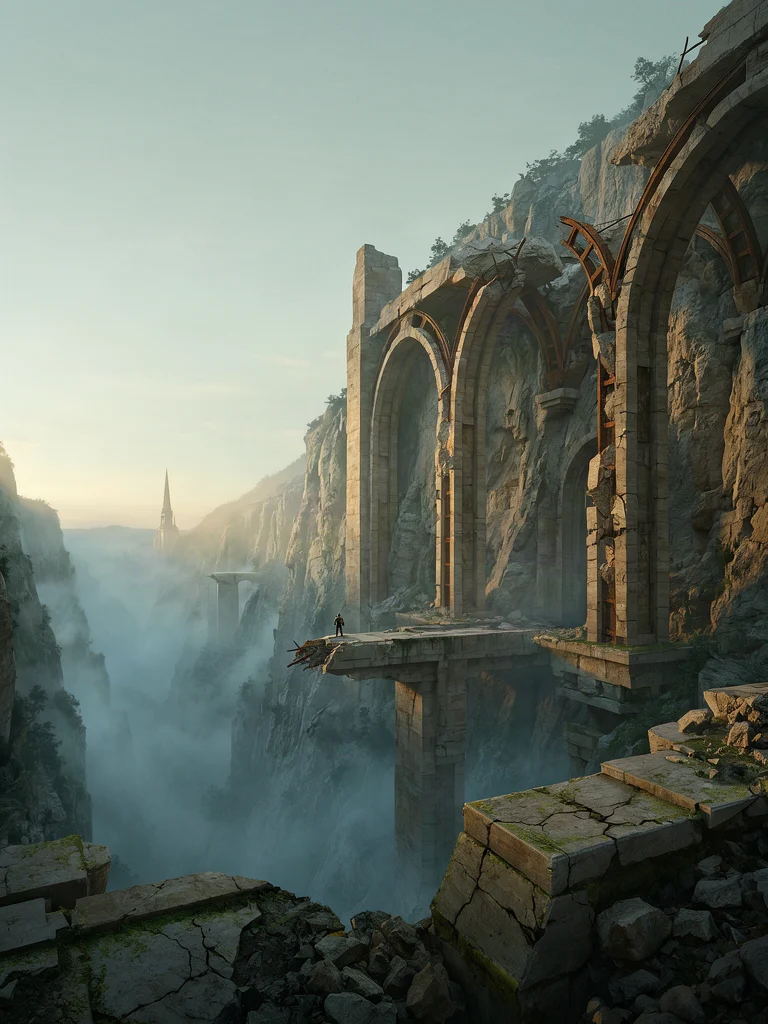
Worldbuilding scene concept art: Morning mist over ruined sanctuary
Style Concept Art · Worldbuilding · Atmosphere
Prompt
Wide cinematic concept art of an abandoned sanctuary on a cliff edge at dawn: enormous stone arches half-collapsed in a mist-filled valley, a lone explorer appears as a silhouette on the broken bridge, providing a scale reference for the composition; clearly layered depth of field, with rubble in the foreground, mist in the midground, and spires in the background; soft directional light slants through the morning mist; a palette of cool, low-saturation teal-green and warm sandstone tones; weathered stone and oxidized metal textures; painterly matte-painting finish with finely detailed architecture; 16:9 horizontal composition with a strong vanishing-point perspective, and ample negative space left in the sky
Copy the full prompt and adapt it for your own generation.
Tags
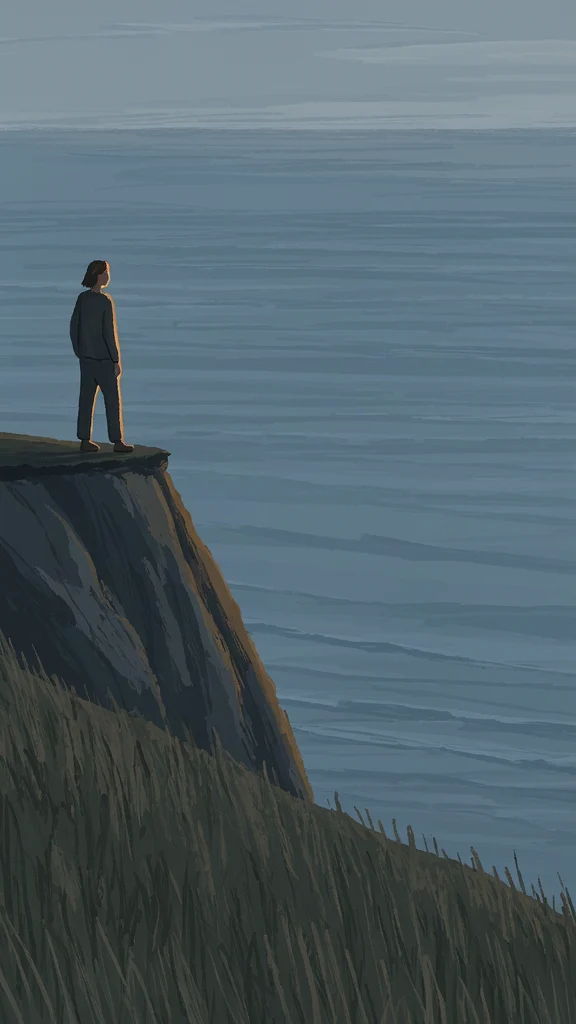
From Realistic to Flat: The Krea 3 Illustration Style Spectrum
Style Illustration · style-spectrum · Editing
Prompt
Editorial-style illustration: at dusk, a solitary figure stands at the edge of a coastal cliff, presented in a low-angle three-quarter view, composed within a 16:9 horizontal frame with a large area of negative space left on the right side. Depict the scene with clearly visible painterly brushstrokes: the sea and sky are rendered with layered cool blue-gray blocks, the cliff rocks are accented with warm ochre, soft rim light outlines the figure's silhouette, and the forms are simplified, remaining structurally readable but never striving for photographic realism. Medium-density detail—foreground grass uses expressive brushstrokes, and the brushstrokes grow broader closer to the horizon. The overall palette is soft and low-saturation, with only one warm focal point retained. No text, no watermark, no extra limbs.
Copy the full prompt and adapt it for your own generation.
Tags
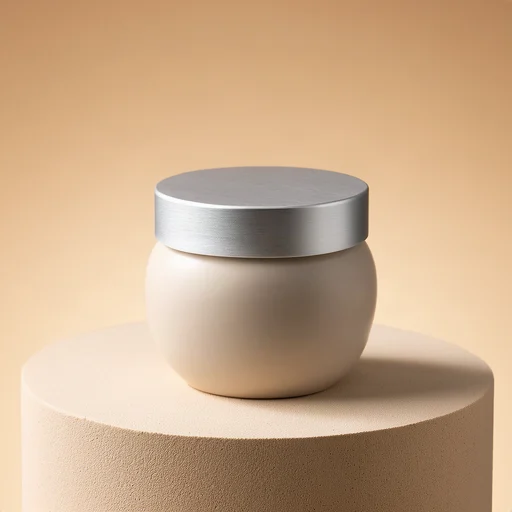
Krea 3 E-commerce Product Image: Tabletop Light and Material Texture
Style Product Image · ecommerce · Studio lighting
Prompt
E-commerce product photography, a matte ceramic cosmetic jar with a brushed aluminum lid, standing on a warm beige plaster pedestal, centered three-quarter view, eye-level camera angled slightly downward, 85mm lens look, shallow depth of field, a soft large softbox key light from the upper left creates a gentle gradient across the curved ceramic surface, a subtle rim light separates the lid edge from the background, a faint contact shadow grounds the base, seamless warm sand-colored gradient background, the glaze shows a clear fine texture, delicate brushed-metal grain on the lid, clean commercial color grading, high detail, no text, no cluttered props, no harsh specular highlights
Copy the full prompt and adapt it for your own generation.
Tags
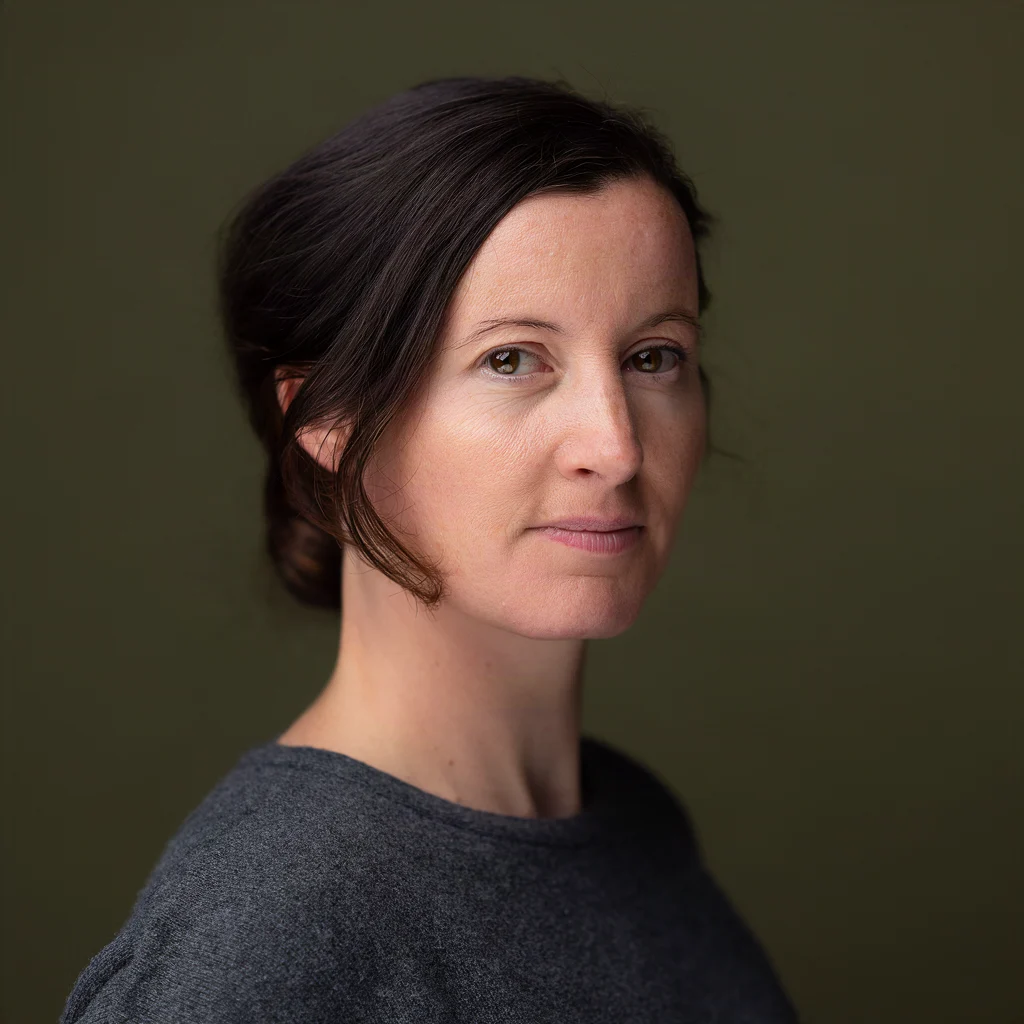
Krea 3 Portrait Prompt Dual-Style Demo: Realistic vs. Artistic
Style Portrait Photography · Prompt Engineering · Editing
Prompt
A portrait photograph of a woman in her early thirties, three-quarter profile view, gaze slightly past the lens, natural unretouched skin with visible pores and fine texture, soft window light from the left of the camera, subtle cool bounce fill light on the right, shallow depth of field around f/2, 85mm lens look, low-saturation neutral tones, deep olive seamless backdrop, hair pulled back with a few loose strands, light makeup, calm neutral expression, vertical 4:3 composition with headroom, fine grain, no beauty retouching
Copy the full prompt and adapt it for your own generation.
Tags
Pricing
krea-3/text-to-image per image
| Unit Price | $0.036 |
|---|
Positioning Overview
krea-3/text-to-image is Krea's model line for text-to-image scenarios, called through the unified HiAPI.ai interface. It accepts text prompts to generate images and offers multiple size presets including square, portrait, and landscape, outputting PNG or JPEG. The line supports two variants, berry and jam: the former leans toward image quality, the latter toward speed. It also allows setting reasoning intensity, negative prompts, and a fixed random seed for reproducible results. It suits development teams that need to balance image quality and generation speed per project and integrate batch generation into their own workflows.
Core Highlights
- Selectable quality and speed tiers——variant offers two options, berry and jam; the former emphasizes quality, the latter emphasizes speed, and you can switch between them based on the task.
- Adjustable reasoning intensity——reasoning_level can be set to low or medium, controlling the degree of reasoning and expansion applied to the prompt before generation; medium takes longer.
- Controllable output size and format——six built-in presets: square, portrait 4:3/16:9, and landscape 4:3/16:9, up to 1024×1024, with output available as PNG or JPEG.
- Reproducible with a fixed seed——passing seed lets identical inputs reproduce the same result, making it easy to debug prompts and compare versions.
Capabilities
Text prompt to image generation: a text description is the only required input and returns a single image; the prompt can be up to 5000 characters, accommodating fairly complete descriptions of subject, style, and composition.
Negative prompt to exclude elements: use negative_prompt (up to 1024 characters) to specify content you do not want to appear in the image, adding another dimension of image control.
Six size presets and format selection: choose square, portrait, or landscape presets according to the final placement, and output PNG or JPEG directly, reducing subsequent conversion steps.
Parameterized result reproduction: once parameters such as seed and reasoning_level are fixed, the same input reliably yields the same output, making it suitable for establishing a repeatable generation baseline.
Use Cases
- Batch image generation for content teams——choose the preset matching the column size and produce one image per call, for placements such as article headers and social media images that need stable output.
- Prompt tuning for designers and developers——fix the seed and adjust prompt and negative prompt item by item, compare output differences, and build reusable prompt templates.
- Producing portrait and landscape assets from the same source——use the same description and switch between portrait and landscape presets to get same-style assets for mobile and web.
- Prototype validation sensitive to generation speed——choose the jam variant and lower the reasoning intensity to quickly get multiple directions early in a project, then use berry to produce refined versions.
Limitations and Selection Advice
Only text-prompt-to-image is supported; it does not accept reference images and does not perform local editing, so for image-to-image or region-specific modifications you should choose a model with the corresponding capabilities. The output limit is 1024×1024, and high-resolution final assets need separate upscaling. negative_prompt only takes effect with the berry variant; when jam is selected, this parameter has no effect. Each call returns one image, so multiple options require multiple requests. If a task requires strictly reproducing an existing character or product appearance, pure text descriptions make consistency difficult to guarantee.
Frequently asked questions
View all FAQs →-
What is Krea 3 good for?
Photoreal shots, portraits, product images, food, architecture, illustration and concept art, plus posters with headline text. Even a short prompt yields a complete scene, which makes it handy for exploring directions.
-
What is the difference between berry and jam?
They are two variants of the same model that share most inputs (negative_prompt applies to berry only): Krea positions berry for quality and jam for speed, at the same price. Switch with input.variant; the default is berry. In side-by-side runs, the same seed gives different framing and color at similar quality, so it is worth trying both.
-
What is reasoning_level and which should I use?
It sets how much effort goes into understanding and expanding the prompt before drawing: low or medium (default). Use medium for short or abstract prompts and low when your prompt is already specific and you want speed.
-
Which sizes are supported?
image_size accepts six presets: square_hd (1024 × 1024, default), square (512 × 512), portrait_4_3 (768 × 1024), portrait_16_9 (576 × 1024), landscape_4_3 (1024 × 768) and landscape_16_9 (1024 × 576).
Create a generation task
https://api.hiapi.ai/v1/tasks Headers
AuthorizationstringRequiredAccount API key. Required on every request. Example: Bearer YOUR_HIAPI_API_KEY. Get your API key
Content-TypestringOptionalThe request body is always parsed as JSON; when sent, only application/json (optionally with charset) is accepted — any other value returns 415. Example: application/json.
Idempotency-KeystringOptionalIdempotency key, up to 255 bytes. Retries with the same key from the same account create the task only once; replays return the original taskId.
On network timeouts or client retries, the same key creates the task only once — no double charges (scope: the API key's account). Use a business-unique identifier as the key (e.g. "order-42"); replays return the original taskId, and keys expire 24 hours after the first request. See the Unified Async API overview for the full scenario matrix.
Body
modelstringRequiredCurrent fixed value: krea-3/text-to-image
routestringOptionalCurrent fixed value: default
inputobjectRequired
Business parameters for krea-3/text-to-image and route default — see the parameter table below.
seedintegerOptionalmin 0max 2147483647A fixed random seed used to reproduce identical generation results; an integer, randomly determined by the server when not provided.
promptstringRequiredminLength 1maxLength 5000The text description of the image to generate, used as the prompt input for the generated content.
variantstringOptionalDefault: "berry"The generation variant tier; berry emphasizes quality, jam emphasizes speed; default is berry.
berryjamimage_sizestringOptionalDefault: "square_hd"The output size preset, supporting up to 1024×1024; default is square_hd.
square_hdsquareportrait_4_3portrait_16_9landscape_4_3landscape_16_9output_formatstringOptionalDefault: "png"The format of the output image; default is png.
pngjpegnegative_promptstringOptionalmaxLength 1024Specifies content to exclude from the image; only takes effect with the berry variant.
reasoning_levelstringOptionalDefault: "medium"Controls the degree of reasoning and expansion applied to the prompt before generation; higher values process more deeply, while medium is relatively slower; default is medium.
lowmediumcallbackobjectOptional
Terminal-state notification config. When omitted, no callback is delivered — poll the task yourself. See the callback note below.
Provide callback.url when creating a task and HiAPI POSTs to your service once the task reaches a terminal state — no polling needed. The callback payload mirrors the task detail structure; signature verification, delivery retries and idempotency are documented on the Unified Async API overview page.
urlstringRequiredRequired when callback is present. A POST is sent to this URL once the task reaches a terminal state; must be a valid http(s) URL.
whenstringOptionalDefault: "final"Only final is supported today — notified on both success and fail.
finalstoragestringOptionalDefault: "temp"Artifact storage tier: temp (default, retained about 7 days) or persistent (long-term, billed by size). Insufficient balance or exceeding the storage cap silently downgrades to temp; the effective tier is shown in the task detail response.
temppersistentRequest examples
# Submit an async task; returns a taskId immediately (no waiting for generation)
curl -X POST "https://api.hiapi.ai/v1/tasks" \
  -H "Authorization: Bearer $HIAPI_API_KEY" \
  -H "Content-Type: application/json" \
  -d '{
  "model": "krea-3/text-to-image",
  "input": {
    "prompt": "…",
    "variant": "berry",
    "image_size": "square_hd",
    "output_format": "png",
    "reasoning_level": "medium"
  }
}'
const res = await fetch("https://api.hiapi.ai/v1/tasks", {
method: "POST",
headers: {
Authorization: `Bearer ${process.env.HIAPI_API_KEY}`,
"Content-Type": "application/json",
},
body: JSON.stringify({
model: "krea-3/text-to-image",
input: {
"prompt": "…",
"variant": "berry",
"image_size": "square_hd",
"output_format": "png",
"reasoning_level": "medium"
}
}),
});
const task = await res.json();
// { code: 200, message: "success", data: { taskId } }import os, requests
res = requests.post(
"https://api.hiapi.ai/v1/tasks",
headers={"Authorization": f"Bearer {os.environ['HIAPI_API_KEY']}"},
json={
"model": "krea-3/text-to-image",
"input": {
"prompt": "…",
"variant": "berry",
"image_size": "square_hd",
"output_format": "png",
"reasoning_level": "medium"
}
},
)
print(res.json()) # { code, message, data: { taskId } }200 OK
{
  "code": 200,
  "message": "success",
  "data": {
    "taskId": "tk-hiapi-01HZTQ8BX2N3GM3YFK4Z9D7VQR"
  }
}
400 Bad Request
{
  "code": 400,
  "message": "invalid request",
  "data": null,
  "error_code": "INVALID_REQUEST"
}
Get task detail
https://api.hiapi.ai/v1/tasks/:id Response fields
taskIdstringRequiredTask ID, always prefixed with tk-hiapi-.
modelstringRequiredResolved full model name. Tasks submitted with the route parameter return base@route (e.g. gpt-image-2/text-to-image@ext); otherwise identical to the name passed at creation.
routestringOptionalPresent only when the task was submitted with an explicit route parameter; echoes the submitted value.
statusstringRequiredTask status.
queued Queued, not started yet.
handling Being processed.
archiving Processing finished, artifacts being prepared.
success Terminal: completed, artifacts available (output returned).
fail Terminal: failed (error returned).
After submission, check status: success and fail are terminal, everything else is non-terminal. Poll every 1–3 seconds until terminal. On success, download artifacts from output[].url and transfer them before expireAt; pass storage: "persistent" at creation time when long-term retention is needed.
creatednumberRequiredTask creation time (Unix seconds).
completednumberRequiredUnix seconds when the task reached a terminal state; fixed to 0 while not terminal.
outputarrayOptional
Present only when status == success. Artifact list — always an array; a single task may return multiple types at once (e.g. video + first_frame).
Array [ object ]
Array items
urlstringRequiredArtifact URL, directly downloadable.
typestringRequiredCurrent possible values: video, image, audio, first_frame, last_frame, thumbnail; more may be added later.
expireAtnumberRequiredUnix seconds until which the artifact remains accessible; download or transfer before it expires.
errorobjectOptional
Present only when status == fail.
codestringRequiredBusiness error code.
messagestringRequiredError description.
Response examples
Success
{
  "code": 200,
  "message": "success",
  "data": {
    "taskId": "tk-hiapi-01HZTQ8BX2N3GM3YFK4Z9D7VQR",
    "model": "happyhorse-1-0",
    "status": "success",
    "created": 1777282033,
    "completed": 1777282099,
    "output": [
      {
        "url": "https://cdn.hiapi.ai/tasks/.../video.mp4",
        "type": "video",
        "expireAt": 1777886899
      }
    ]
  }
}
Processing (non-terminal)
{
  "code": 200,
  "message": "success",
  "data": {
    "taskId": "tk-hiapi-...",
    "model": "happyhorse-1-0",
    "status": "archiving",
    "created": 1777282033,
    "completed": 0
  }
}
Failed
{
  "code": 200,
  "message": "success",
  "data": {
    "taskId": "tk-hiapi-...",
    "model": "happyhorse-1-0",
    "status": "fail",
    "created": 1777282033,
    "completed": 1777282099,
    "error": {
      "code": "TASK_FAILED",
      "message": "task failed"
    }
  }
}Articles
View all articles →Related Models
View all models →Same Type
-
 FLUX.2 Klein 4B Black Forest Labs $0.0004 /image
-
 Grok Imagine Image 2.0 xAI $0.052 /image
-
 BRIA Eraser Bria $0.058 /image
-
 Imagen 4 Google $0.030 /image
-
 Grok Imagine Quality xAI $0.070 /image
-
 FLUX 1.1 Pro Black Forest Labs $0.050 /image
-
 Qwen Image 2.1 Alibaba $0.020 /image
-
 Ideogram V4 Ideogram $0.050 /image
-
 FLUX.1 Schnell Black Forest Labs $0.005 /image
-
 Ideogram V3 Character Ideogram $0.090 /image
-
 FASHN Tryon v1.6 FASHN $0.107 /image
-
 Google Virtual Try-On Google $0.107 /image