

Black Forest Labs
FLUX.1 Schnell
flux-schnell/text-to-image
Black Forest Labs' distilled text-to-image model, a 12-billion-parameter rectified flow transformer focused on low-latency fast image generation, suitable for batch creation of concept art and sketches
Try flux-schnell/text-to-image
Input
Showcases
View all showcasesOutput
image
FLUX.1-schnell E-commerce-Grade Product Photography Texture Generation
Style Product Image · ecommerce-studio · Soft light
Prompt
Studio product photography, a matte amber glass pump bottle with a brushed metal collar, placed slightly left of center on a seamless light gray background, resting on a subtle acrylic riser. A softbox at the upper left serves as the key light, a narrow strip light on the right grazes the right edge to create a crisp rim highlight, and a top diffuser flattens the specular highlights on the metal. 85mm equivalent lens, shallow depth of field, focus on the label, soft falloff toward the background, neutral white balance, clean commercial retouching texture, ample negative space in the upper right for an e-commerce corner badge, 16:9 composition.
Copy the full prompt and adapt it for your own generation.
Tags

FLUX.1-schnell Style Spectrum: From Realistic to Flat Portraits of a Young Woman
Style Illustration · style-spectrum · character-portrait
Prompt
A half-body portrait of a young woman looking back over her shoulder, soft window light coming in from the left, on a plain warm gray background. Rendered in a realistic painting style: visible brushstroke texture, delicate translucent skin, individually distinct strands of hair, clothing folds with soft shadow transitions, low-saturation natural tones. 16:9 composition, with the figure slightly off-center and ample negative space on the right.
Copy the full prompt and adapt it for your own generation.
Tags

FLUX.1-schnell Worldbuilding Scene Concept Art
Style Concept Art · Worldbuilding · Sci-Fi
Prompt
Cinematic wide-angle establishing shot, at dusk, an abandoned coastal observation station embedded in a volcanic rock cliff face, a giant rusted radio parabolic dish antenna half-submerged in a tidal pool, thin cables strung between concrete pylons, distant aurora bleeding green and purple into low-hanging storm clouds, wet basalt reflecting warm sodium lights, a lone figure in a weathered orange survival jacket walking along the causeway for scale reference, layered atmospheric haze and sea foam, soft teal and amber tones with cool rim light, volumetric god rays, highly detailed hard-surface architecture and organic rock textures, photorealistic concept art, 35mm anamorphic lens look, shallow depth of field at the foreground railing, 16:9 composition, horizon located in the lower third of the frame
Copy the full prompt and adapt it for your own generation.
Tags

FLUX.1-schnell Portrait Style Demo: Realistic vs. Artistic Comparison
Style Portrait & Photography · Photorealistic · Prompt Reference
Prompt
A portrait of a young woman sitting beside a large window, three-quarter profile view, calmly looking directly at the camera, natural skin texture, visible pores and fine hair strands, soft diffused daylight coming in from the left, gently transitioning to a low-key warm gray interior background, shallow depth of field, 85mm lens look, Kodak Portra color style, subtle film grain, balanced exposure, rich detail in the eyes and lips, no heavy retouching, vertical 3:4 composition, photographic work.
Copy the full prompt and adapt it for your own generation.
Tags
Pricing
flux-schnell/text-to-image per image
| Unit Price | $0.005 |
|---|
Positioning Overview
FLUX.1-schnell is a text-to-image model released by Black Forest Labs. It uses a 12-billion-parameter rectified flow transformer architecture and has been optimized through distillation, so it can generate high-quality images at relatively low inference step counts, with a good balance between prompt adherence and detail rendering. The model can be accessed through the unified HiAPI.ai interface, making it suitable for developers and content creation scenarios that need to quickly produce concept images and visual assets.
Key Highlights
- Distilled architecture for fast image generation with few steps — The official recommendation is 1 to 4 inference steps to complete denoising and generation, making it suitable for interactive scenarios with response speed requirements.
- Balanced prompt adherence and detail rendering — Built on a 12-billion-parameter rectified flow transformer, it performs well in image detail and prompt alignment.
- Flexible control over aspect ratio and output format — Supports five aspect ratios: 1:1, 4:3, 3:4, 16:9, and 9:16, with jpeg or png output, making it easy to adapt to different layout requirements.
Capability Description
Text-to-image generation: Enter a text prompt to generate the corresponding image, suitable for quickly turning creative descriptions into visual assets.
Adjustable inference steps and guidance scale: You can set 1 to 12 inference steps (officially recommended: 1 to 4 steps) and a guidance scale from 1 to 20, balancing speed and prompt adherence as needed.
Reproducible results with a fixed seed: By specifying a random seed, you can reproduce generation results under the same parameters, which helps with debugging and consistency management in batch tasks.
Content safety filter toggle: Safety checks are enabled by default and can be turned off as needed, making it convenient to adjust content policies flexibly in controlled environments.
Use Cases
- Designers quickly generating concept sketches — Enter scene or style descriptions to quickly produce multiple concept images for early creative communication and direction screening.
- Developers building text-to-image applications — Integrate the model into your own product workflow to generate illustrations or visual assets in real time based on user input.
- Generating illustrations for content creation — Batch-generate illustrations for articles, social media, and other scenarios in specified aspect ratios and formats, ready for direct publication.
Limitations and Model Selection Advice
This model only supports text-to-image generation and does not cover other modalities such as video or text. As a distilled version, its results may be inferior to non-distilled models in scenarios with complex prompts or high-precision requirements; actual output is affected by prompt quality, sampling parameters, and the runtime environment. If you need multimodal capabilities or higher-precision image generation, we recommend evaluating other models.
Frequently asked questions
View all FAQs →-
What is FLUX.1 [schnell] best for?
A fast, low-cost 1-4 step model for drafts, batch generation, and rapid prompt exploration.
-
Does FLUX.1 [schnell] accept reference images?
No. This route is text-to-image only.
-
Which output settings are supported?
The page exposes 1-12 inference steps and 1:1, 16:9, 9:16, 4:3, 3:4; use the Playground contract for the final available set.
-
How is FLUX.1 [schnell] billed?
Billing is per successful generated image. Resolution or quality differences, when present, are reflected by the live page price.
Create a generation task
https://api.hiapi.ai/v1/tasks Headers
AuthorizationstringRequiredAccount API key. Required on every request. Example: Bearer YOUR_HIAPI_API_KEY. Get your API key
Content-TypestringOptionalThe request body is always parsed as JSON; when sent, only application/json (optionally with charset) is accepted — any other value returns 415. Example: application/json.
Idempotency-KeystringOptionalIdempotency key, up to 255 bytes. Retries with the same key from the same account create the task only once; replays return the original taskId.
On network timeouts or client retries, the same key creates the task only once — no double charges (scope: the API key's account). Use a business-unique identifier as the key (e.g. "order-42"); replays return the original taskId, and keys expire 24 hours after the first request. See the Unified Async API overview for the full scenario matrix.
Body
modelstringRequiredCurrent fixed value: flux-schnell/text-to-image
routestringOptionalCurrent fixed value: default
inputobjectRequired
Business parameters for flux-schnell/text-to-image and route default — see the parameter table below.
seedintegerOptionalRandom seed used to reproduce generation results; passing the same seed yields consistent output.
promptstringRequiredText prompt used for image generation.
aspect_ratiostringOptionalDefault: "4:3"Aspect ratio of the output image, default 4:3.
1:14:33:416:99:16output_formatstringOptionalDefault: "jpeg"Format of the output image, default jpeg.
jpegpngguidance_scalenumberOptionalDefault: 3.5min 1max 20Controls how closely the generated result follows the prompt, default 3.5.
num_inference_stepsintegerOptionalDefault: 4min 1max 12Number of denoising steps, default 4; for the schnell model, 1-4 is recommended.
enable_safety_checkerbooleanOptionalDefault: trueWhether to enable content safety filtering, default true.
callbackobjectOptional
Terminal-state notification config. When omitted, no callback is delivered — poll the task yourself. See the callback note below.
Provide callback.url when creating a task and HiAPI POSTs to your service once the task reaches a terminal state — no polling needed. The callback payload mirrors the task detail structure; signature verification, delivery retries and idempotency are documented on the Unified Async API overview page.
urlstringRequiredRequired when callback is present. A POST is sent to this URL once the task reaches a terminal state; must be a valid http(s) URL.
whenstringOptionalDefault: "final"Only final is supported today — notified on both success and fail.
finalstoragestringOptionalDefault: "temp"Artifact storage tier: temp (default, retained about 7 days) or persistent (long-term, billed by size). Insufficient balance or exceeding the storage cap silently downgrades to temp; the effective tier is shown in the task detail response.
temppersistentRequest examples
# Submit an async task; returns a taskId immediately (no waiting for generation)
curl -X POST "https://api.hiapi.ai/v1/tasks" \
  -H "Authorization: Bearer $HIAPI_API_KEY" \
  -H "Content-Type: application/json" \
  -d '{
  "model": "flux-schnell/text-to-image",
  "input": {
    "prompt": "…",
    "aspect_ratio": "4:3",
    "output_format": "jpeg",
    "guidance_scale": 3.5,
    "num_inference_steps": 4,
    "enable_safety_checker": true
  }
}'
const res = await fetch("https://api.hiapi.ai/v1/tasks", {
method: "POST",
headers: {
Authorization: `Bearer ${process.env.HIAPI_API_KEY}`,
"Content-Type": "application/json",
},
body: JSON.stringify({
model: "flux-schnell/text-to-image",
input: {
"prompt": "…",
"aspect_ratio": "4:3",
"output_format": "jpeg",
"guidance_scale": 3.5,
"num_inference_steps": 4,
"enable_safety_checker": true
}
}),
});
const task = await res.json();
// { code: 200, message: "success", data: { taskId } }import os, requests
res = requests.post(
"https://api.hiapi.ai/v1/tasks",
headers={"Authorization": f"Bearer {os.environ['HIAPI_API_KEY']}"},
json={
"model": "flux-schnell/text-to-image",
"input": {
"prompt": "…",
"aspect_ratio": "4:3",
"output_format": "jpeg",
"guidance_scale": 3.5,
"num_inference_steps": 4,
"enable_safety_checker": True
}
},
)
print(res.json()) # { code, message, data: { taskId } }200 OK
{
  "code": 200,
  "message": "success",
  "data": {
    "taskId": "tk-hiapi-01HZTQ8BX2N3GM3YFK4Z9D7VQR"
  }
}
400 Bad Request
{
  "code": 400,
  "message": "invalid request",
  "data": null,
  "error_code": "INVALID_REQUEST"
}
Get task detail
https://api.hiapi.ai/v1/tasks/:id Response fields
taskIdstringRequiredTask ID, always prefixed with tk-hiapi-.
modelstringRequiredResolved full model name. Tasks submitted with the route parameter return base@route (e.g. gpt-image-2/text-to-image@ext); otherwise identical to the name passed at creation.
routestringOptionalPresent only when the task was submitted with an explicit route parameter; echoes the submitted value.
statusstringRequiredTask status.
queued Queued, not started yet.
handling Being processed.
archiving Processing finished, artifacts being prepared.
success Terminal: completed, artifacts available (output returned).
fail Terminal: failed (error returned).
After submission, check status: success and fail are terminal, everything else is non-terminal. Poll every 1–3 seconds until terminal. On success, download artifacts from output[].url and transfer them before expireAt; pass storage: "persistent" at creation time when long-term retention is needed.
creatednumberRequiredTask creation time (Unix seconds).
completednumberRequiredUnix seconds when the task reached a terminal state; fixed to 0 while not terminal.
outputarrayOptional
Present only when status == success. Artifact list — always an array; a single task may return multiple types at once (e.g. video + first_frame).
Array [ object ]
Array items
urlstringRequiredArtifact URL, directly downloadable.
typestringRequiredCurrent possible values: video, image, audio, first_frame, last_frame, thumbnail; more may be added later.
expireAtnumberRequiredUnix seconds until which the artifact remains accessible; download or transfer before it expires.
errorobjectOptional
Present only when status == fail.
codestringRequiredBusiness error code.
messagestringRequiredError description.
Response examples
Success
{
  "code": 200,
  "message": "success",
  "data": {
    "taskId": "tk-hiapi-01HZTQ8BX2N3GM3YFK4Z9D7VQR",
    "model": "happyhorse-1-0",
    "status": "success",
    "created": 1777282033,
    "completed": 1777282099,
    "output": [
      {
        "url": "https://cdn.hiapi.ai/tasks/.../video.mp4",
        "type": "video",
        "expireAt": 1777886899
      }
    ]
  }
}
Processing (non-terminal)
{
  "code": 200,
  "message": "success",
  "data": {
    "taskId": "tk-hiapi-...",
    "model": "happyhorse-1-0",
    "status": "archiving",
    "created": 1777282033,
    "completed": 0
  }
}
Failed
{
  "code": 200,
  "message": "success",
  "data": {
    "taskId": "tk-hiapi-...",
    "model": "happyhorse-1-0",
    "status": "fail",
    "created": 1777282033,
    "completed": 1777282099,
    "error": {
      "code": "TASK_FAILED",
      "message": "task failed"
    }
  }
}Articles
View all articles →-
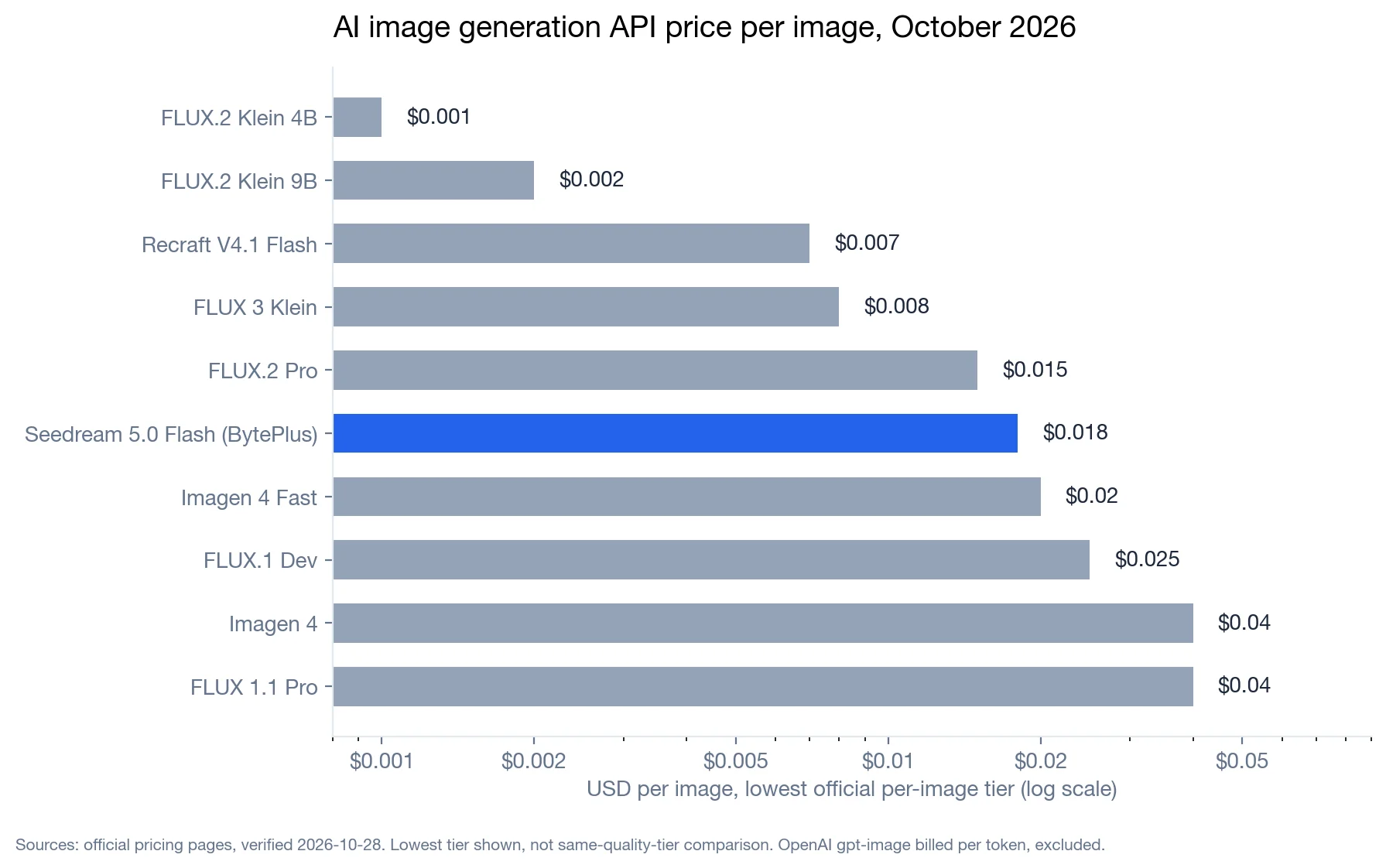
Comparison
AI Image Generation API Pricing Compared (October 2026): Cost per Image and Free Tier Reality
Verified October 28, 2026: official per-image prices run from $0.001 to $0.24, a two-orders-of-magnitude spread. One table to see where the money goes
8 -

Comparison
Stable Diffusion API Alternatives in 2026: flux-2, nano-banana-2, z-image and flux-schnell Compared
8 -

Guide
Cheapest Image and Video Generation APIs: Live Prices on HiAPI
The lowest-cost image and video models on HiAPI with today's prices, how to work out cost per image you keep, and FLUX.1 Schnell outputs at $0.005.
8
Related Models
View all models →Same Type
-
 FLUX.1 Kontext Max Black Forest Labs $0.071 /image
 -
 Nano Banana 2 Lite Google $0.033 /image
 -
 Krea 3 Krea $0.036 /image
 -
 Ideogram V4.5 Ideogram $0.011 /image
 -
 BRIA Eraser Bria $0.058 /image
 -
 Nano Banana Pro Google $0.029 /image
 -
 BRIA Product Shot Bria $0.058 /image
 -
 Krea 2 Medium Turbo Krea $0.021 /image
 -
 FLUX.1 Fill Pro Black Forest Labs $0.071 /image
 -
 FLUX.2 Klein 9B Black Forest Labs $0.0086 /image
 -
 GPT Image 2.5 OpenAI $0.017 /image
 -
 FLUX.2 Klein 4B Black Forest Labs $0.0004 /image
Same Provider
- FLUX.2 Klein 4B Black Forest Labs $0.0004 /image
-
 FLUX.2 Black Forest Labs $0.035 /image
 - FLUX.1 Fill Pro Black Forest Labs $0.071 /image
- FLUX.1 Kontext Max Black Forest Labs $0.071 /image
-
 FLUX 3 Video Black Forest Labs $0.090 /second
 -
 FLUX 1.1 Pro Black Forest Labs $0.050 /image
 - FLUX.2 Klein 9B Black Forest Labs $0.0086 /image
-
 FLUX 3 Image Black Forest Labs $0.041 /image
 -
 FLUX 3 Max Black Forest Labs $0.061 /second