
Guide
Kling 3.0 Turbo Image-to-Video: Make Short-Form Video with the hiapi API
- Kling 3.0 Turbo i2v pricing (720p/1080p)
- $0.13–$0.16/s
- clip duration range
- 3–15s
- end-to-end render time (8s, 1080p)
- ~2.5 min
- minimum required input (prompt + image_urls)
- 2 fields
A single still photo and one API call is all it takes to get a scroll-stopping short-form clip out of Kling 3.0 Turbo image-to-video on hiapi. No timeline editor, no motion rigging, no green screen — you send a first-frame image and a short motion prompt, and you get back an 8-, 10-, or 15-second .mp4 a couple of minutes later. This walkthrough builds one clip end to end with the real /v1/tasks API, shows the actual cost breakdown, and turns the same code into a loop you can point at a folder of stills for TikTok- or Reels-ready output.
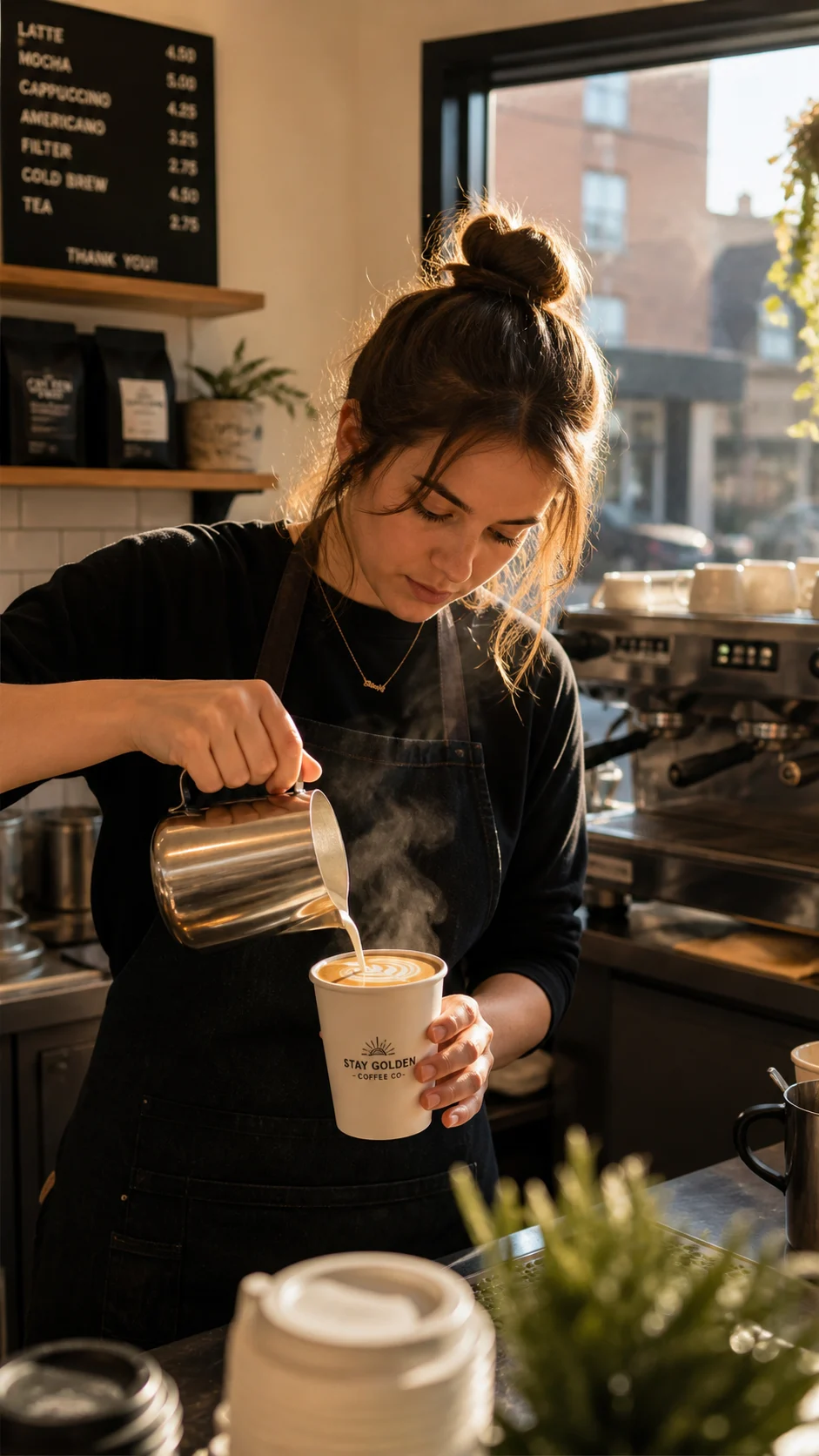
Here's the clip this article produces, generated from a single first-frame photo:
What Kling 3.0 Turbo Image-to-Video Actually Needs From You
The model's input schema is short, and that's the whole point — you don't have to reason about camera rigs or keyframes, just two required fields and two optional ones:
prompt(string, required) — describes the motion you want, not the whole scene. The first frame already defines the scene; the prompt tells the model what should move.image_urls(array, required) — a single public URL to your first-frame image (JPEG or PNG, up to 10MB). This is the only image the model takes; there's no multi-reference mode here.duration(integer, optional, default5) — clip length in seconds,3to15.resolution(string, optional, default720p) —720por1080p.
The detail worth planning around: there's no aspect_ratio parameter. The output frame always inherits the composition of your input image — a 9:16 first frame renders a 9:16 clip, no override available. If you're building for TikTok or Reels, generate (or crop) your first frame to 9:16 before you touch the video endpoint, or you'll be re-running an $0.65–$1.60 generation just to fix framing. Full parameter reference and a live try-it panel are on the model page.
Step 1: Start From a Strong First Frame
Before generating anything new, check whether you already have a usable still — a product photo, a past AI generation, a piece of brand photography. Since Kling 3.0 Turbo image-to-video only reads the first frame to define the whole scene, reusing an existing image costs you nothing extra at the video step; you only pay for the seconds of motion you generate.
If you don't have one, generating a first frame is a normal text-to-image call. This article's first frame came from gpt-image-2/text-to-image, composed vertically from the start so the video inherits the right framing:
import requests

resp = requests.post(
    "https://api.hiapi.ai/v1/tasks",
    headers={"Authorization": f"Bearer {HIAPI_API_KEY}"},
    json={
        "model": "gpt-image-2/text-to-image",
        "input": {
            "prompt": (
                "Vertical smartphone-shot photo of a barista in a small specialty "
                "coffee shop pouring steaming latte art into a white ceramic to-go "
                "cup, warm golden morning light streaming through a large window "
                "behind her, steam curling upward, shallow depth of field, cozy "
                "minimalist cafe aesthetic, natural candid framing typical of a "
                "TikTok food video, photorealistic, high detail, 9:16 vertical composition"
            ),
            "aspect_ratio": "9:16",
            "resolution": "1K",
        },
    },
)
task_id = resp.json()["data"]["taskId"]
That's the exact first frame used below, generated once, then fed into the video step:
Step 2: Turn the Still Into a Clip
Every model on hiapi runs through the same async task pattern: POST to create the job, poll GET until it resolves, then download the output before its temporary link expires. For image-to-video, the only difference is the input payload:
curl -s -X POST https://api.hiapi.ai/v1/tasks \
  -H "Authorization: Bearer $HIAPI_API_KEY" \
  -H "Content-Type: application/json" \
  -d '{
    "model": "kling-3.0-turbo/image-to-video",
    "input": {
      "prompt": "The barista continues pouring steamed milk in a slow spiral, latte art rosetta blooming across the surface of the coffee, steam swirling upward and catching the warm morning light, her hand moves the pitcher in a smooth steady motion, camera holds a subtle slow push-in, natural handheld micro-movement, shallow depth of field, cozy cafe ambience, smooth natural motion, stable cinematic camera movement",
      "image_urls": ["https://static.hiapi.ai/blog/kling-3-0-turbo-image-to-video-short-form-video/first-frame.jpg"],
      "duration": 8,
      "resolution": "1080p"
    }
  }'
Then poll for the result:
import time, requests

def wait_task(task_id, token, timeout_s=600, poll_interval=5):
    deadline = time.time() + timeout_s
    while time.time() < deadline:
        r = requests.get(
            f"https://api.hiapi.ai/v1/tasks/{task_id}",
            headers={"Authorization": f"Bearer {token}"},
        ).json()
        task = r.get("data") or {}
        if task.get("status") == "success":
            return task
        if task.get("status") == "fail":
            raise RuntimeError(task.get("error"))
        time.sleep(poll_interval)
    raise TimeoutError(task_id)

task = wait_task(task_id, HIAPI_API_KEY)
video_url = task["output"][0]["url"]  # temporary link — download it immediately
The 8-second, 1080p clip embedded above came straight out of this call and took about two and a half minutes from submit to a downloadable .mp4 — no manual editing, no post-processing.
What This Actually Costs
Kling 3.0 Turbo image-to-video is billed per second, tiered by resolution (confirmed against hiapi's pricing as of August 2026):
| Resolution | Price per second | 5s clip | 8s clip | 15s clip |
|---|---|---|---|---|
| 720p | $0.13/s | $0.65 | $1.04 | $1.95 |
| 1080p | $0.16/s | $0.80 | $1.28 | $2.40 |
The hero clip in this article — 8 seconds at 1080p — cost $1.28. If you're testing prompts or iterating on motion before committing to a final render, do those passes at 720p and only bump to "resolution": "1080p" once the motion reads the way you want; that alone cuts iteration cost by roughly 20%.
Batching It: From One Clip to a Content Calendar
Because there's no separate "batch" endpoint — it's the same task call, just looped — turning this into a short-form content pipeline is mostly bookkeeping:
clips = [
    {"image_url": "https://your-bucket/product-a.jpg", "prompt": "..."},
    {"image_url": "https://your-bucket/product-b.jpg", "prompt": "..."},
    {"image_url": "https://your-bucket/product-c.jpg", "prompt": "..."},
]

results = []
for clip in clips:
    resp = requests.post(
        "https://api.hiapi.ai/v1/tasks",
        headers={"Authorization": f"Bearer {HIAPI_API_KEY}"},
        json={
            "model": "kling-3.0-turbo/image-to-video",
            "input": {
                "prompt": clip["prompt"],
                "image_urls": [clip["image_url"]],
                "duration": 8,
                "resolution": "1080p",
            },
        },
    )
    task_id = resp.json()["data"]["taskId"]
    results.append(wait_task(task_id, HIAPI_API_KEY))
Run that against a folder of product shots, portraits, or scene photography overnight and you wake up to a stack of ready-to-post clips — each one costing exactly what the table above says, with no surprise line items. If you'd rather start from a text description instead of an existing photo, the companion Kling 3.0 Turbo text-to-video guide covers that entry point using the same task API.
FAQ
How long does Kling 3.0 Turbo image-to-video take to render? In this test, an 8-second 1080p clip completed in about two and a half minutes from task submission to a downloadable file. Shorter clips at 720p typically finish faster.
Can I get a 9:16 vertical output?
Yes, but indirectly — there's no aspect_ratio parameter on this model. The output always matches your input image's framing, so generate or crop your first frame to 9:16 before submitting the video task.
What image formats work as the first frame?
JPEG or PNG, up to 10MB, supplied as a public URL in the image_urls array. The array only accepts a single image for this model.
How much does an 8-second 1080p clip cost? $1.28, at the confirmed rate of $0.16 per second for 1080p. The same clip at 720p is $1.04.
Does the prompt support dialogue or lip-sync?
Yes — the prompt field (up to 2,500 characters) supports quoted dialogue, which the model can use to drive lip-sync animation on a speaking subject in the first frame.
Try It Yourself
Everything above ran through the live /v1/tasks endpoint with a real key — no mocked responses, no placeholder assets. If you've got a photo library sitting idle, the fastest way to see the model's motion quality on your own subject is to try one clip: head to the Kling 3.0 Turbo image-to-video model page, drop in a first-frame image, and get your first result back in a few minutes.
Related articles
View all articles →-

Guide
Getting Started with seedream-5.0-pro/image-to-image: Capabilities, Pricing, and Integration Essentials
Capability boundaries, billing model, and engineering integration practices for ByteDance's image editing model
-
Guide
seedream-5.0-pro Text-to-Image Getting Started Guide: Capability Boundaries, API Integration, and Cost Control
A hands-on developer perspective: from key parameters to a cost estimate of $0.05 per image
-
Guide
Hailuo 2.3 Fast Image-to-Video Getting Started Guide: Capability Boundaries, Pricing, and Integration Practices
MiniMax image-to-video model selection and integration key points for developers